
Appearance
Add liquidity on PancakeSwap V2 (legacy)
The SPACE-BNB PancakeSwap V2 pool is the oldest SPACE liquidity pool. It is still counted in your SPACE LP balance on Final Autoclaim, so this guide is kept for the liquidity providers who already use it.
WARNING
This is the only SPACE pool that the SPACE Liquidity UI does not manage. You add and remove liquidity from PancakeSwap's own interface, and the steps below therefore look different from every other network.
If you are starting from scratch on BNB Smart Chain, use the PancakeSwap V3 pool instead: it is managed by our own interface and the flow is much shorter. See Add liquidity on BNB Smart Chain.
Already have a V2 position? PancakeSwap V2 pools will likely be deprecated in the coming months — follow Migrate PancakeSwap liquidity from V2 to V3 to move it across.
What is liquidity mining?
Liquidity mining, also known as yield farming, is the act of providing liquidity via cryptocurrencies to decentralized exchanges (DEXs). Since the primary goal of an exchange is to be liquid, DEXs reward users willing to bring capital to their platform.
Most DEXs are decentralized by replacing order books with an Automated Market Maker (AMM). An AMM is a smart contract that regulates trading. Since smart contracts are decentralized, users do not have to trade the order book of an exchange. Instead, they effectively trade with other users.
The AMM collects trading fees and grants them to each liquidity provider (LP) as a reward. The DEX therefore offers a symbiotic ecosystem where each group of users helps the other: the token swapper pays a small fee to trade, and the liquidity provider earns money for providing the liquidity that the swapper needs.
Before you start
You need SPACE and BNB in your Web3 wallet on the BNB Smart Chain network.
We recommend using Rabby.io as a Web3 wallet, since that's probably the most secure and the user experience is great.
1. Open the pool page and connect your wallet
Go to https://pancakeswap.finance/add/BNB/0x9e1170c12fddd3b00fec42ddf4c942565d9be577 and connect the wallet that holds your SPACE and BNB.

Click the Connect button to link your BNB Smart Chain wallet.
2. Select "Use BNB instead"
The pool pairs SPACE with plain BNB, not wrapped BNB (WBNB). Opt in to the Use BNB option.

Select Use BNB instead so the pool uses native BNB.
3. Enter the amount you want to add
You need to provide SPACE and BNB in a 50/50 ratio (for example, $5 of SPACE and $5 of BNB).
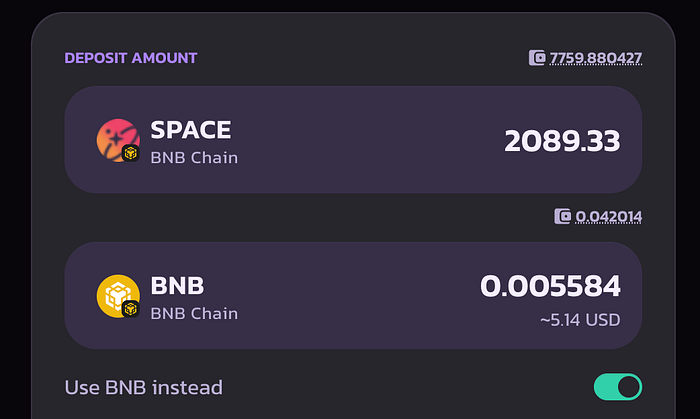
PancakeSwap fills in the second amount so the 50/50 ratio is respected.
4. Enable SPACE
Enable SPACE so the token can interact with the pool. This requires you to sign a transaction on your Web3 wallet; don't worry, it is safe.

Click the Enable SPACE button.
5. Add the liquidity
Click the Add button to see the details of the position you are about to create.

Click the Add button.
Then click Confirm Supply, which asks you to sign the last transaction on your Web3 wallet.
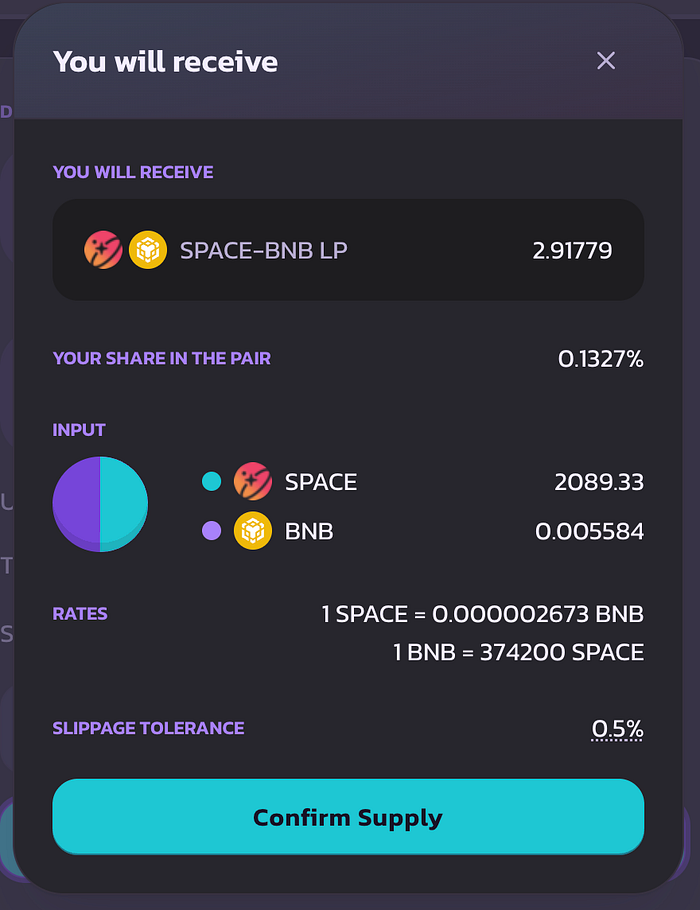
Click Confirm Supply and sign the transaction.
Check your position
Once the tokens are added, your liquidity is visible on https://pancakeswap.finance/liquidity.
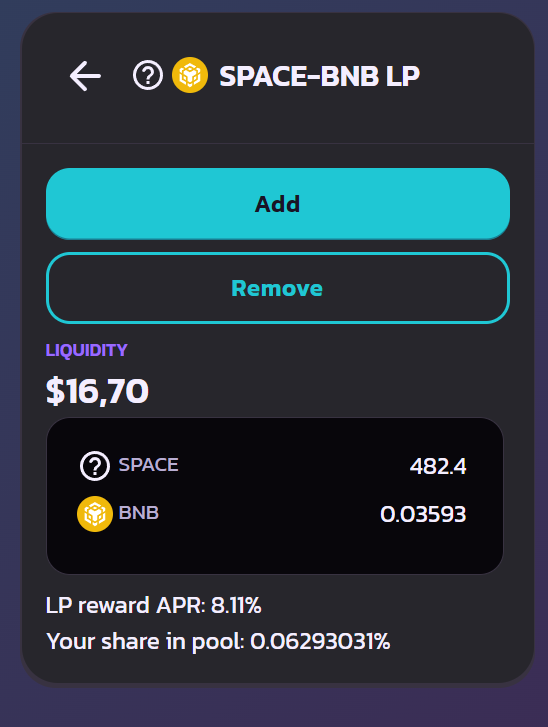
This position contains ~2089 SPACE and ~0.0055 BNB, for a total liquidity value of around $10.
INFO
PancakeSwap V2 has no Claim Fees action: the trading fees accrue inside the position itself and are paid out when you remove your liquidity.
🎉 Congratulations!
You've successfully added SPACE and BNB to the PancakeSwap V2 liquidity pool.
- Refresh your SPACE LP balance on the Space Bonuses page of Final Autoclaim to enjoy the bonuses.
- Once your LP balance is refreshed, activate the SPACE LP staking pool to enjoy a high APR.
INFO
See how much your liquidity earns you: SPACE LP bonuses